gagit

Wrong Language!

11 years ago
I live in Spain but have always put my profile as UK and have had no problems for the past year or so but now suddenly I am getting email from Houzz in Spain(in Spanish!) and also all the stories in the Houzz app are now in Spanish and not English. Help!

Comments (19)

  • 11 years ago

    HI @gagit!

    Thanks for getting in touch! To change the newsletter you receive, head to 'Your Houzz' and click 'Edit Profile' on the cover photo. Click on Advanced Settings where you should see the 'Newsletter Edition' header, and click United Kingdom from the drop-down menu.

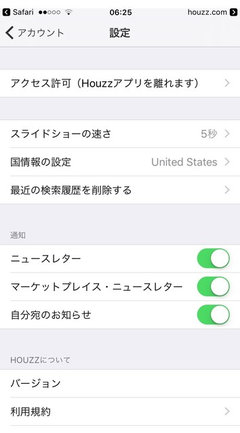
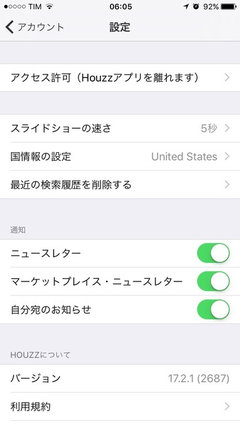
    To switch countries in the app, head to 'Your Houzz' (the icon in the top left-hand corner if you're using the iPhone) and click 'Account'. Once there head to 'Settings' and click on the 'Country' icon to change to the UK. You should then see UK content.

    To switch countries on a desktop, all you need do is scroll down to the bottom of the page and click on the drop down menu beneath the Houzz icon.


    If you are still receiving emails in Spanish other than the newsletter, please get in touch with UK Support here.

    Hope that helps!

  • 9 years ago
    i tried my best but I still cannot change my language! Please please someone help me change language I know go to Edit profile and advanced setting but I have no idea about it in Japanese!!!! I am starting hating this app please help me
  • 9 years ago
    last modified: 9 years ago

    Hi SeongEun,

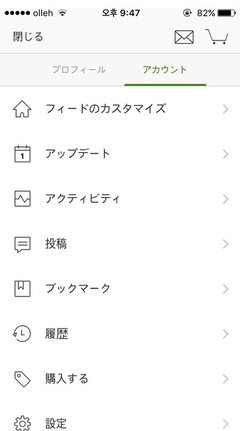
    I can see that you're based in Korea, which is probably why you're defaulting to the Japanese app - apologies. To change your app settings, tap on your profile picture (top left corner). Then the second option in the navigation bar, highlighted in your screen grab. You will then see a list with 7 rows - tap on the row that displays the little cog wheel (6th row). On the following screen, tap the third one down. I'm not sure if the final screen is in Japanese, but if it is, the US is at the top and UK is second to last.

    Hope this helps and let me know if you need further instructions.

  • 9 years ago
    Hi. My app stills in Japanese. I'm in Brazil.
  • 9 years ago

    Hi Camilla,

    Did you happen to see my instructions above? If you did, please let me know if you tried them and what happened when you tried to update.


    Thanks!

  • 9 years ago
    Hey, Emmeline Westin. Thank you

    Yes, I follow. It's like the print ? Just change the newsletter.
  • 9 years ago

    Hi Camilla,

    I see. How about this. If you go to your iPhone settings, and tap 'General. Then tap 'Language and regions'. Change your iPhone language to English (or Portuguese if you're in Brazil) and your Region to United States (or Brazil).

    Let me know if this works!

  • 9 years ago
    Hey, Enmeline!
    Thank you!

    Japanese was the first option. I don't know why, but now the app is in English. :)
  • 9 years ago

    Great news!

  • 8 years ago

    Hey, Enmeline!

    I tried everything you said above, but my Houzz language is still Germany? I'm in China. ORZ Please help


  • 8 years ago

    Hi Illmiller - would you be able to send a screen shot of your settings please? Thanks!

  • PRO
    8 years ago

    Mine is in French. Nothing seems to work. I have a business listing so it’s a nightmare to try to respond to people.

  • 8 years ago

    Hi Improve to Move,

    It would be helpful if I can see a screen grab of the settings, please.

  • PRO
    8 years ago

  • PRO
    8 years ago

  • 8 years ago

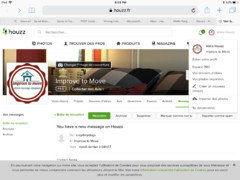
    Thank you @Improve to Move! What happens if you log in to you account on Houzz.com, instead of Houzz.fr? I can see your URL is Houzz.fr at the moment, which means you're being redirected to the French site. You can switch country by scrolling down to the footer of the page. There'll you see a dropdown menu and you can select United States. Let me know if this works!

  • PRO
    8 years ago

    I can log in and it's all in English now, but when someone sends a message to my business through houzz, it ends up being in French.

  • 8 years ago

    @Improve to Move – thanks for explaining. Looks like we've discovered a bug! It has been reported now and should be fixed shortly.